
I Built an AI Content Automation CLI Tool — Would You Use It?
It Started with Blogging
For the past few days, I’ve been using Claude Code to write blog posts. The experience is genuinely fun — I just say “write me a post about X,” and it generates a draft, translates it to English, and even helps with deployment.
But as I kept going, I noticed a problem: I still have to manually handle several steps every time.
Open the terminal, type commands, review content, commit, deploy. None of these steps are complicated on their own, but strung together, the workflow is still fragmented.
That got me thinking: Why not automate the entire workflow?
The Inspiration: What ChatGPT Can’t Do, the CLI Can
Most people use AI tools like ChatGPT and Claude through a web interface. You type something, it responds, and then you copy-paste the result somewhere else.
This model has a fundamental limitation: it’s interactive, not automatable.
You can’t have ChatGPT automatically write a blog post for you every morning at 8 AM. You can’t have it crawl your bookmarks, read through them, and generate a summary. And you definitely can’t have it publish the result to your blog or social media.
But the command line can do all of this.
The CLI is built for automation. A single command can chain together: collect materials → generate content → proofread → publish. Pair it with scheduled tasks or a CI/CD pipeline, and it runs completely hands-free.
VibPage: What I Built
Once I had the idea, I just went for it. I registered vibpage.com a couple of days ago, and spent the next few days building the tool. It’s called VibPage, and it’s now at version v0.1.17.
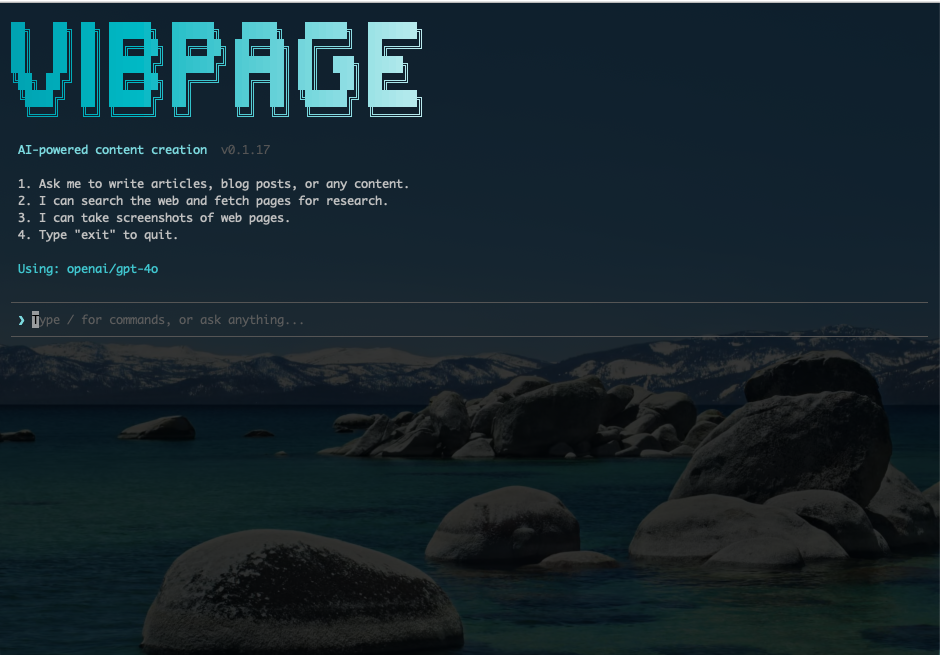
When you open VibPage, you’ll see a clean command-line interface. Here’s what it can do:
1. Content Creation
This is the core feature. You can ask it to write articles, blog posts, or any text content. It calls AI models under the hood (currently supporting OpenAI’s GPT-4o) to generate content based on your needs.
2. Web Research
It can search the web and fetch page content for research. This means the generated content isn’t fabricated from thin air — it’s grounded in real sources. Give it a topic, and it will search for relevant materials before writing.
3. Web Screenshots
It can also capture screenshots of web pages, making it easy to reference and showcase in your articles.
4. Author Persona Configuration
Everyone writes differently. You can configure an “author persona” — your writing style, target audience, tone preferences, areas of expertise, etc. This way, the generated content sounds like you, not generic AI slop.
5. Auto-Publishing
When you’re done, publish wherever you want. It could support personal blogs (Hugo, Astro, Jekyll, etc.), Twitter/X, LinkedIn, and other platforms.
6. Fully Automated Pipelines
The ultimate usage is chaining everything together. Pair it with scheduled tasks, and it automatically collects materials, generates a weekly digest, and publishes it to your blog. You just need to glance at the quality occasionally.
Why Not Just Use Existing Tools?
You might be thinking: “I could cobble this together with some Python scripts.”
True. But here’s the thing:
- Most content creators don’t write scripts. They need something that works out of the box.
- Everyone’s DIY solution is different. There’s no unified best practice and no community.
- Persona management is the key differentiator. It’s not just about tweaking a prompt — you need a system to maintain your writing style, accumulated knowledge, and preferences.
What I want to build is a productized version of “using AI to produce content” — making it a fundamental tool for content creators.
But I Have a Question
Honestly, I’m not sure if there’s real demand for this.
On one hand, the number of content creators comfortable with the command line might be small. On the other hand, technical users might prefer the flexibility of writing their own scripts.
So I want to ask:
Would you use this tool?
Specifically, I’d love to know:
- Who are you? Developer? Content creator? Indie entrepreneur?
- How do you currently produce content? Purely manual? AI-assisted? Do you have your own automation workflow?
- Which feature is most appealing to you? Web research? Persona management? Auto-publishing? Or the fully automated pipeline?
- Would you pay for something like this? If so, what feels like a reasonable price?
Open Source & Next Steps
VibPage is fully open source under the AGPL-3.0 license. The code is on GitHub: github.com/eickegao/VibPage. Stars, issues, and contributions are all welcome.
Version v0.1.17 already has the core features working. Here’s what I’m planning next:
- Refine the persona system — make style configuration more granular
- Add more publishing channels — close the last mile
- Optimize the automation pipeline — truly “set it once, let it run”
If you’re interested or have suggestions, feel free to leave a comment. You can also keep an eye on vibpage.com.
Sometimes a great tool starts with “I need this myself.” VibPage is exactly that.